




Want to maximize the number of people who see your updates on LinkedIn – without paying for ads? Here’s the secret: Hashtags.
Hashtags have been used on Twitter and Instagram for many years but were only introduced on LinkedIn recently. They perform the same basic function on LinkedIn — they make it easier to discover content on topics you’re interested in. But they work differently, and you won’t necessarily want to use the same hashtags across all platforms.
If you’re new to hashtags, here’s how they work:
A hashtag is a word or phrase that follows the “#” symbol. You can add hashtags to any status update, blog post, or video you publish or share on LinkedIn. There is no limit to how many hashtags you can use, although most experts suggest three to five per post.
When you add a hashtag, your content is shared with anyone who follows that hashtag, in addition to the people in your network. This significantly expands the number of people who can see what you have posted.
Creating the Best Hashtag for Your Content
It’s important to choose your hashtags thoughtfully, as the right hashtags can have a big impact on your LinkedIn visibility and engagement.
Just because a hashtag is popular on Twitter or Instagram does not mean it will be popular on LinkedIn. Hashtags on Twitter lean towards news and events. For example, every conference you attend will have its own hashtag, and any significant news event will have dozens. On Instagram, they provide a way to comment and build community.
On LinkedIn most people use hashtags to follow topics.
LinkedIn automatically suggests hashtags when you write a post. But the suggestions are based on the text you have just typed, along with hashtags you have used in the past. They are not based on data about what topics LinkedIn members are following. (At some point, LinkedIn will enhance their algorithm to include this, but it’s not there now.)
So don’t just use the tags LinkedIn offers. Instead, run some searches to see whether the hashtags you are considering have followers.
To search popular hashtags on LinkedIn:
- Log into LinkedIn, go to the Search bar at the top of the page, and start typing the hashtag you are considering (make sure you include the # at the beginning of the word).
- LinkedIn will suggest hashtags as you type. Choose the one you have in mind.
- At the top of the results, you’ll be able to see how many people follow that hashtag. The more followers, the more people will see your post if you use that hashtag.
When you do this, you’ll be surprised at some of the hashtags that are popular – and unpopular.
Here’s an example… Say you’re posting an article about building your personal brand. With a quick search, you’ll see that #personalbrand has 218 followers, while #personalbranding has more than 10.5 million followers. That’s a huge difference!
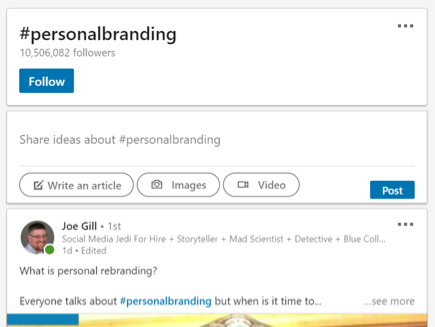
Here are some more examples:
- #bitcoin
More than 318,000 people are currently following #bitcoin on LinkedIn, but only 8,200 follow #cryptocurrency. Also, while #bitcoins is the most popular bitcoin hashtag on Twitter, it has no reported followers on LinkedIn. - #startups
#startup has 26,000 followers on LinkedIn, but #startups has 20.5 million followers. - #technology
While hashtags like #technews (219 followers) or #techtrends (279 followers) may seem like more relevant options, #technology has nearly 25 million followers — the obvious choice for more LinkedIn views.
A couple more tips…
- Hashtags can’t include spaces or punctuation.
- Before you use a hashtag, look at what others are posting using the same hashtag. You might find that it is being used in a different way from what you expected.
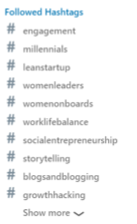
- You can see the hashtags you are currently following on the left side of your homepage or go to your LinkedIn Hashtags page, which also offers suggestions for other tags you might consider.
Hashtags, when they’re relevant and used appropriately, can have a big impact on your reach. Content posted with the right hashtags will gain thousands more views – and some of those people will reach out to connect with you, so you grow your network too. With a little searching and experimentation, you’ll quickly reap the benefits of hashtags, boosting engagement and making more professional connections.